To count a weekly event between two dates, first find the first matching date F inside the interval. If F is after the end date E, the count is zero. Otherwise, for inclusive boundaries, count = floor((E − F) / 7) + 1, using calendar days. Adjust the resulting occurrence list for cancellations and added dates before treating it as the actual schedule.
“Once a week means four times a month” works until a fifth occurrence, a late start, or a cancellation changes the plan. A short list of dates makes those differences visible before you reserve time or estimate workload.
Define what you are counting
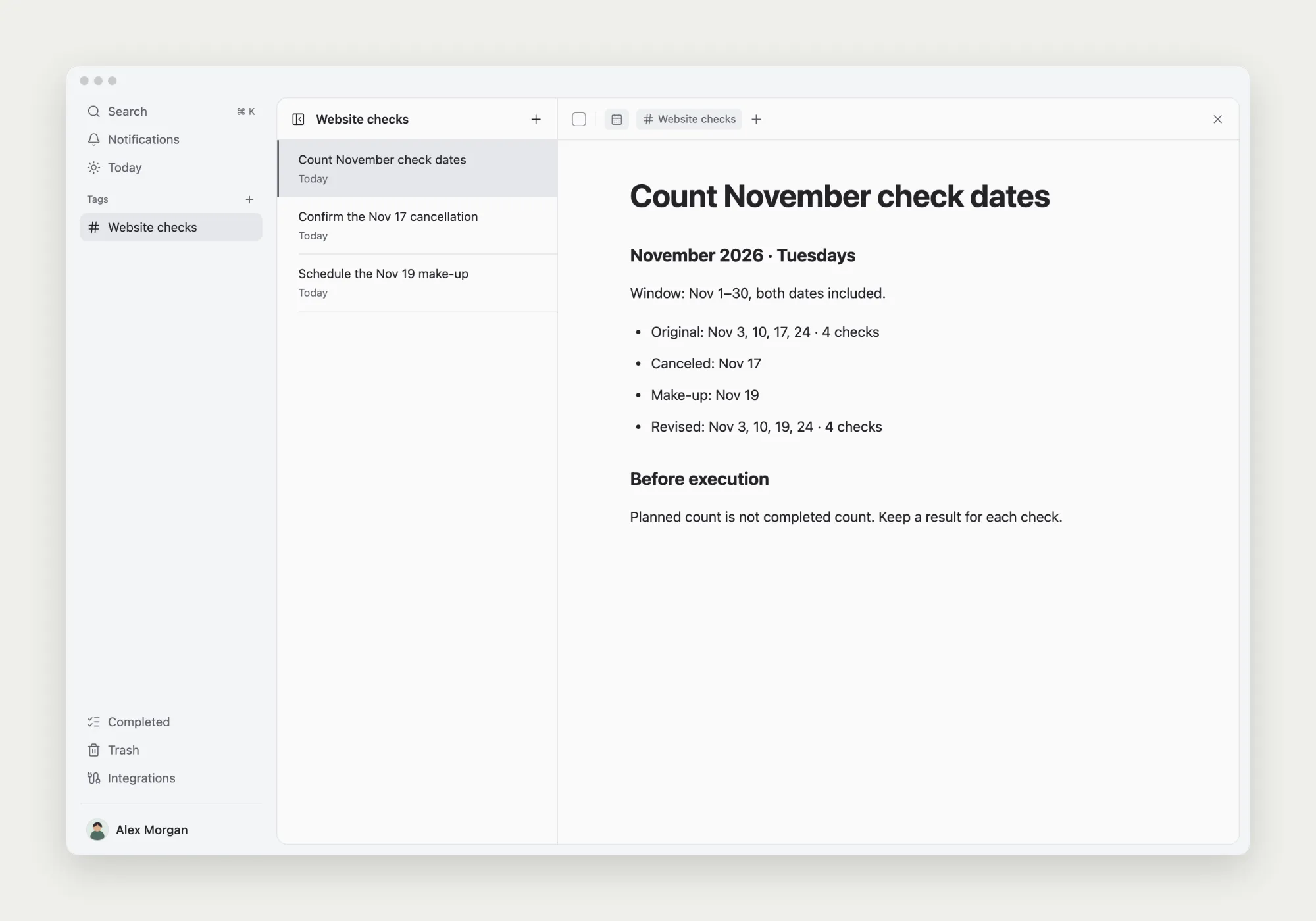
Alex Morgan coordinates a weekly website check. The planning window runs from November 1 through November 30, 2026, inclusive, with one check each Tuesday. November 1 is a Sunday, so the first matching date is November 3. The unit here is one occurrence per local calendar date.
Planned occurrences, events that actually happened, and completed checks are different totals. Calculate the schedule first; use execution records to establish completion later.
Find the first occurrence before dividing by seven
There are 27 calendar days from November 3 to November 30. floor(27 / 7) + 1 = 4. The dates are November 3, 10, 17, and 24. Dividing the length of the whole month by seven misses the weekday alignment.
| Window | Matching November dates | Count |
|---|---|---|
| Nov 1–30, inclusive | 3, 10, 17, 24 | 4 |
| Nov 5–30, inclusive | 10, 17, 24 | 3 |
| Nov 1–24, inclusive | 3, 10, 17, 24 | 4 |
| Nov 1 up to, but excluding, Nov 24 | 3, 10, 17 | 3 |
When the window starts on November 5, use November 10 as F. If no matching date falls inside a short window, return zero rather than blindly applying the final “+1.”
Count several weekdays or every other week
For Tuesdays and Thursdays, build the two date lists, merge them, and remove duplicates when counting dates. November 10–26, 2026 contains November 10, 12, 17, 19, 24, and 26: six occurrences. If two separate sessions happen on one day, count sessions or event IDs instead of distinct dates.
For every other week, keep the original anchor. Starting November 3 with a 14-day interval gives November 3 and 17. Restricting the reporting window to November 10–30 leaves November 17; it does not restart the sequence on November 10.
Treat exceptions as changes to the occurrence list
Alex cancels the November 17 check and adds a make-up check on November 19. Remove the canceled date from the original four and add the new date: the revised schedule still contains four occurrences. Only subtract cancellations that were actually in the reporting window, and only add dates inside it.
A reschedule removes the old occurrence and adds the replacement. Moving it outside the reporting window reduces this window’s count. Moving it onto another scheduled date requires deciding whether two sessions remain or one combined session replaces them.
A recurring-event count template
Event / activity:
Reporting window / time zone:
Include the start date?
Include the end date?
Count dates or separate sessions?
Weekdays / interval / original anchor:

First matching date in the window:
Original dates / original count:
Canceled dates / reasons:
Added dates / replaced occurrences:
Duplicate or merge rule:
Revised dates / planned count:
Actual completion dates / unresolved checks:Keep calendar dates distinct from elapsed hours
Crossing a month boundary does not change a seven-day rule. A monthly rule such as “the 31st,” however, is not an every-four-weeks rule. For meetings with a time of day, choose the event’s time zone first: across daylight-saving changes, the same local weekly time may be separated by something other than 168 elapsed hours.
The calendar standard RFC 5545 recurrence rules distinguishes the starting point, repetition, and ending conditions. In a calendar app, inspect the actual occurrence list and exceptions as well as the frequency label.
Keep the schedule beside the execution record
In TodoNote, keep the calculation in a task note and schedule the checks that need action. Current recurring-task settings support daily, Monday–Friday, or weekly on one selected weekday. Weekdays do not automatically exclude public holidays. The multi-day and exception calculations above are planning methods; they are not extra controls in the recurrence editor.
Preview a rule before enabling it, and check the rule and the individual task when skipping or adding work. Preserve the reason for the adjustment. See the recurring-task guide for settings and recurring-task templates for keeping a separate result from every run.