A useful daily work log records the date, the work handled, its actual outcome, and any unresolved issues. Add time and source materials when relevant, then check the next action before finishing the day. Those facts become usable evidence for weekly updates and handovers.
A to-do describes an intention; a work log records what happened. A task can move forward without being finished. An investigation can finish while revealing a separate piece of work. Capture those distinctions while they are still clear.
What belongs in a daily work log?
Start with the date, activity, outcome, blocker, and next action. Add start and end times or duration when you need a record of effort or sequence. If time was not tracked, do not reconstruct an exact number from a vague memory.
| Field | Question it answers | Example |
|---|---|---|
| Activity | What did I work on? | Reconcile event registration counts |
| Outcome | What was established or delivered? | 42 submissions include 3 duplicates; 39 people remain |
| Open issue | What is still unresolved? | Final attendance list is not approved |
| Next action | What will I do next? | Confirm the list before sending reminders |
| Evidence | Where can I check this later? | Registration export and reconciliation note |
Capture the detail in the original task
Morgan coordinates an online event. The day includes updating event FAQs, reconciling registrations, and preparing an attendee reminder. The registration system shows 42 submissions, while the working list contains 39 people. The reconciliation task records that specific question.
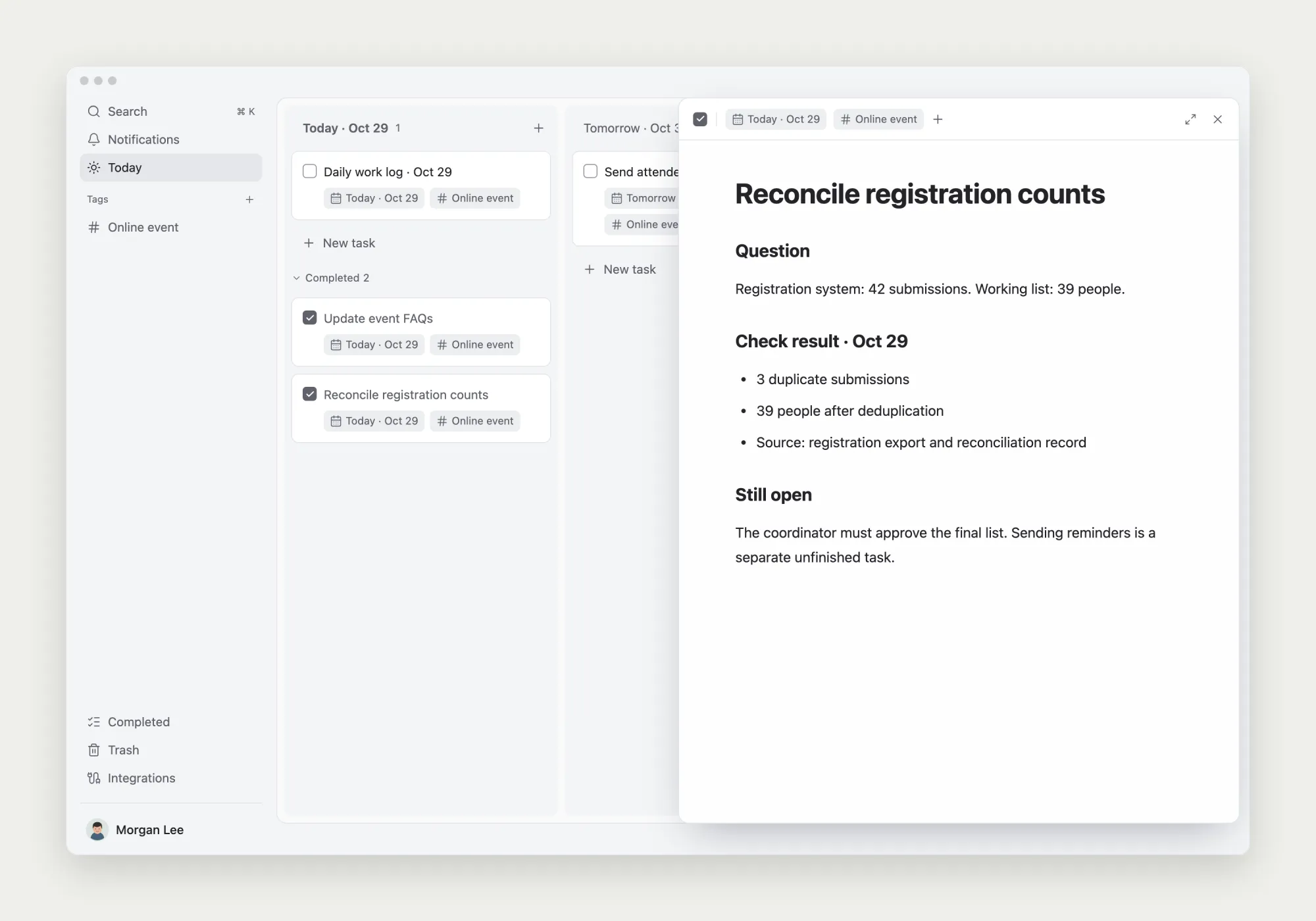
The completed check identifies three duplicate submissions and records the export's location. That task can finish because the discrepancy is explained. The final attendee list still needs approval, and the reminder has not been sent.
Add short notes as material facts change. For work spanning several days, date important updates so that earlier decisions remain understandable. Keep the detailed process in the original task instead of copying it into every daily summary.
A daily work log template to copy
Daily work log | Date:

Item 1:
- Work performed:
- Outcome / current state:
- Issue or blocker:
- Related task, document, or deliverable:

Item 2:
- Work performed:
- Outcome / current state:
- Issue or blocker:
- Related task, document, or deliverable:

New work captured but not yet handled:
Next actions for tomorrow:
Who to follow up with, and what to confirm:
Time record, if needed and supported:Repeat the item section only as often as needed. Omit empty blocker fields. If your team requires a particular daily-report format, collect the facts first and arrange them for that audience afterward. A private work log can stay brief.
A filled example with three different outcomes
The October 29 log has three entries: the FAQ update was published; registration counts were reconciled, with 42 submissions representing 39 people; the attendee reminder remains unsent pending approval of the final list.
The check is finished, while the reminder remains open. Keeping those outcomes separate prevents “reconciliation complete” from being read as “all event preparation complete.”
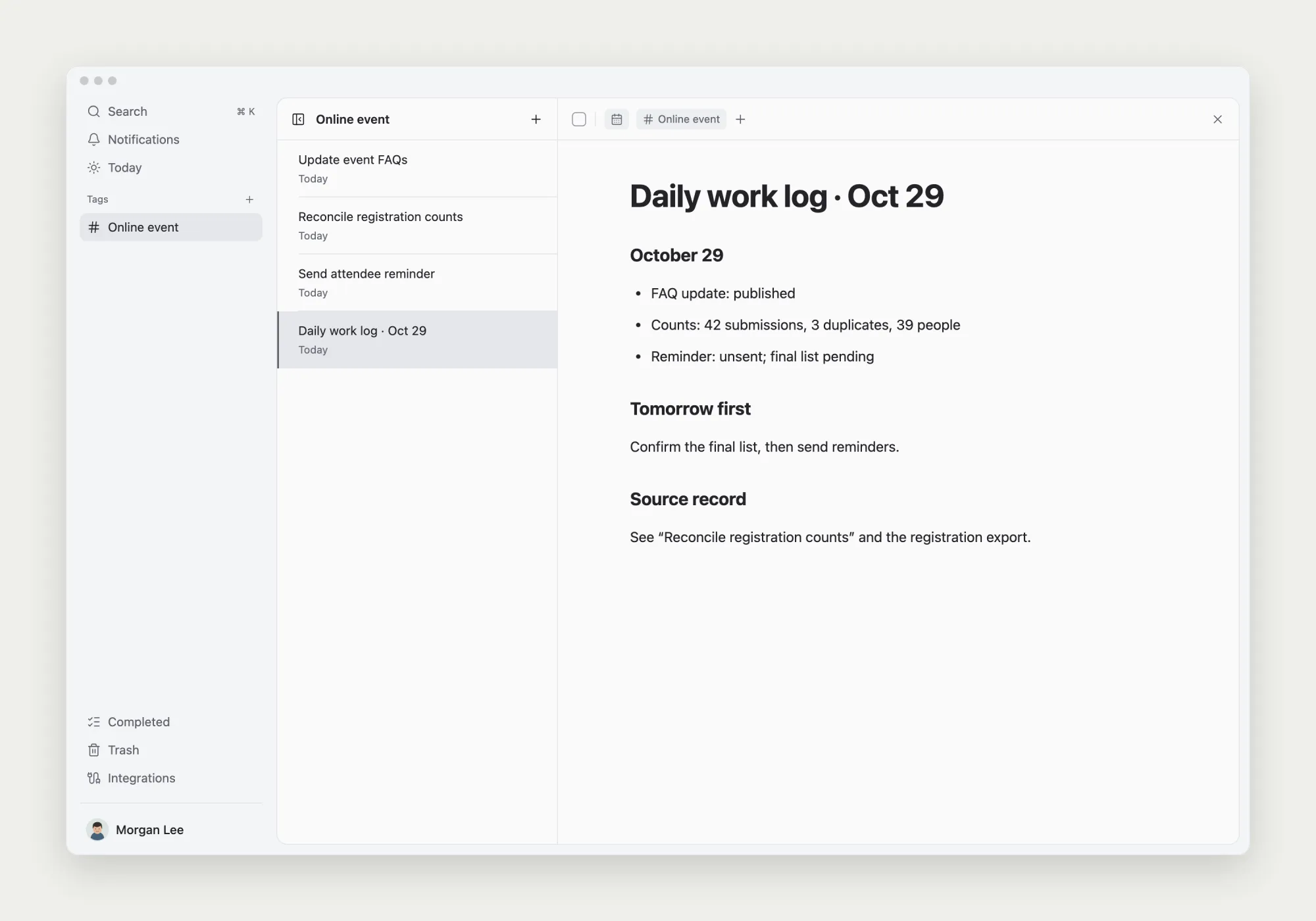
In TodoNote, create a daily log task and write the summary in its note. Give the log and relevant work the same event tag for retrieval. Dates, outcomes, and source locations are authored entries; the log does not automatically aggregate tasks or track time.
Keep source notes where the work happened and refer back by task name and material location. If separate task records already meet your needs, a daily summary is optional; you do not need to duplicate them to satisfy a template.
Replace vague activity with checkable outcomes
“Handled event work” becomes “FAQ published; count discrepancy explained by three duplicates; reminder waiting on the final list.” The latter records progress and the remaining dependency, making the entry useful when read later.
Include unplanned work according to what actually happened. An initial investigation stays an initial investigation with open questions. A finished draft that has not been sent has two different states worth preserving.
Turn daily records into updates and handovers
For a weekly work report, select relevant outcomes, risks, and requests from the week's logs. Combine repeated progress on the same item. For handovers, organize around the current state and point to the original records and working files.
Smartsheet's work-log guide includes formats for activities, time, and status. This template focuses on personal working records. When hours matter, add the required fields and capture them as the work occurs.